Top > Technical-notes > VNWA > Displays the converted Capacitance data as a graph.

Displays the converted Capacitance data as a graph.

Create a frequency-capacitance graph of capacitor using EXCEL.

Import the VNWA data of the frequency characteristics of the capacitor into EXCEL.
Convert Capacitor's VNWA-s1p data to capacitance.
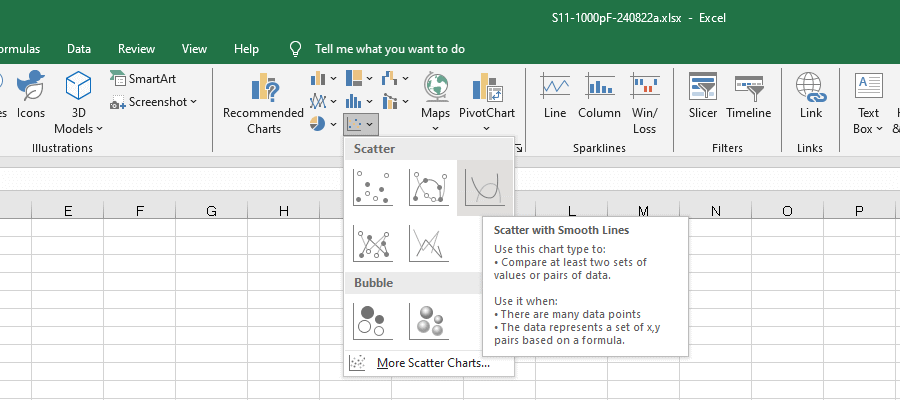
 Select the Scatter with Smooth Lines for the graph.
This image shows how to measure the S11 of a 1000pF capacitor using a Vector Network Analyzer (VNWA3E) DG8SAQ and create a capacitance vs. frequency graph from the data obtained. The image shows the graph type selected.
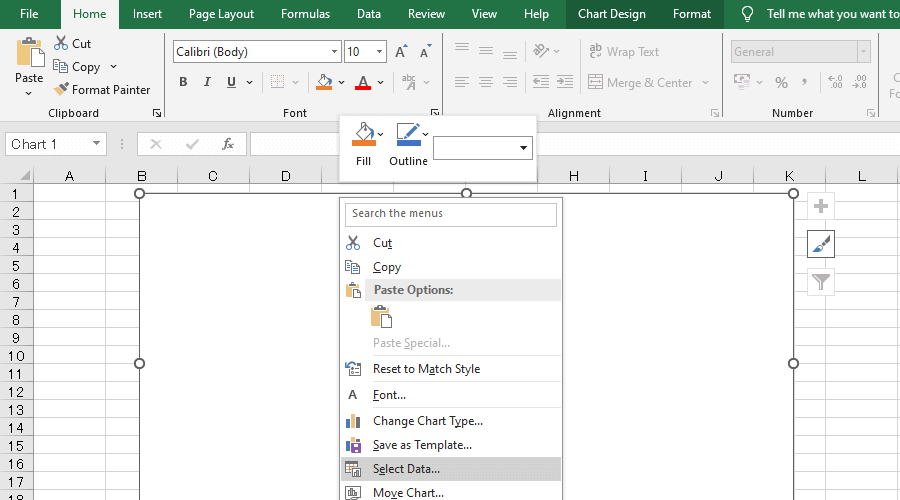
Right-click the chart area and click Select Data.
This image explains how to measure the S11 of a 1000pF capacitor using a Vector Network Analyzer (VNWA3E) DG8SAQ and create a capacitance vs. frequency graph from the data obtained. It shows the steps to add graph data.
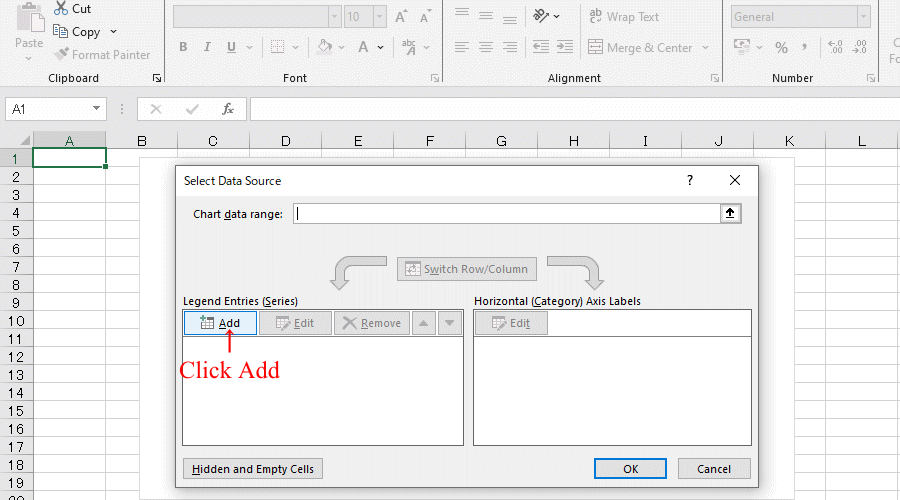
This image explains how to measure the S11 of a 1000pF capacitor using a Vector Network Analyzer (VNWA3E) DG8SAQ and create a capacitance vs. frequency graph from the data obtained. This image shows the graph data being added.
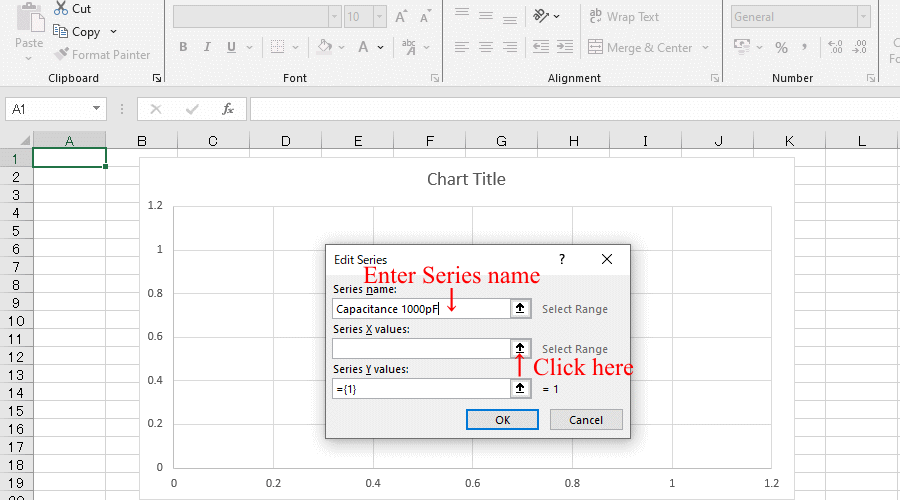
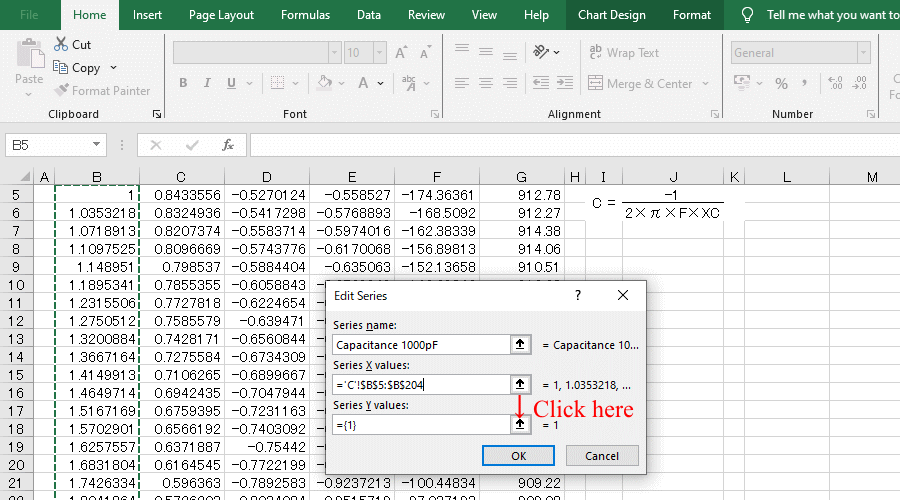
Enter the Series name and then click the Select Range arrow. 
This image explains how to measure the S11 of a 1000pF capacitor using a Vector Network Analyzer (VNWA3E) DG8SAQ and create a capacitance vs. frequency graph from the data obtained. The image shows the process of entering the title for the graph.
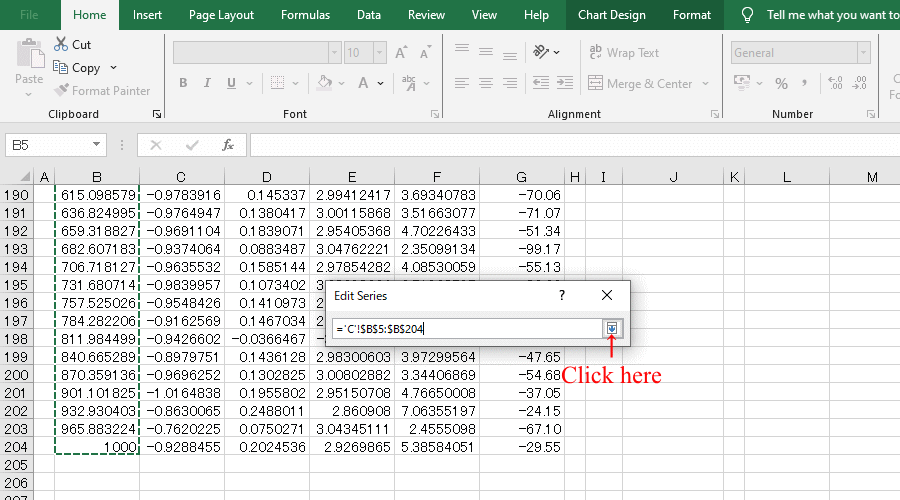
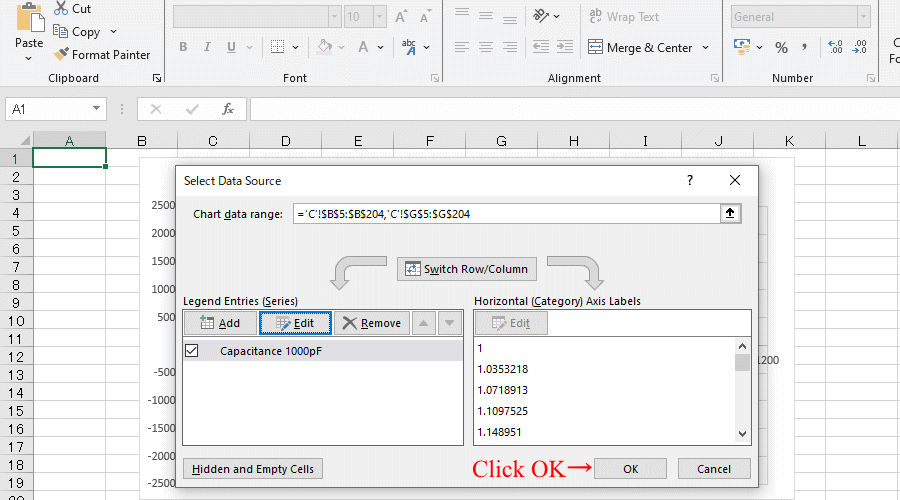
A small window will appear; open the file or sheet containing the converted data,
Select all frequency data and click the arrow.
This image explains how to measure the S11 of a 1000pF capacitor using a Vector Network Analyzer (VNWA3E) DG8SAQ and create a capacitance vs. frequency graph from the data obtained. This image shows how to select the frequency axis of the graph.
This image shows how to measure the S11 of a 1000pF capacitor using a Vector Network Analyzer (VNWA3E) DG8SAQ and create a capacitance vs. frequency graph from the data obtained. Here we set the capacitance axis of the graph.
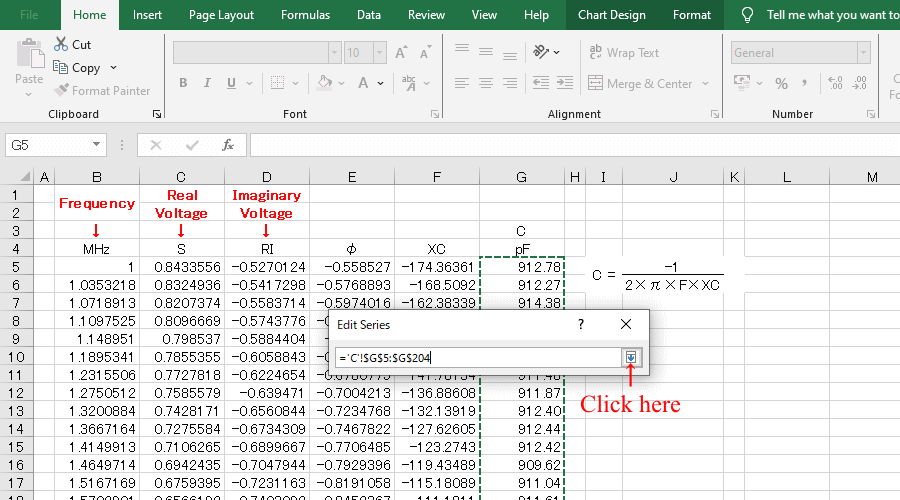
A small window will appear; open the file or sheet containing the converted data,
Select all pF data and click the arrow.
This image shows how to measure the S11 of a 1000pF capacitor using a Vector Network Analyzer (VNWA3E) DG8SAQ and create a capacitance vs. frequency graph from the data obtained. This section explains how to set the range of the capacitance axis of the graph.
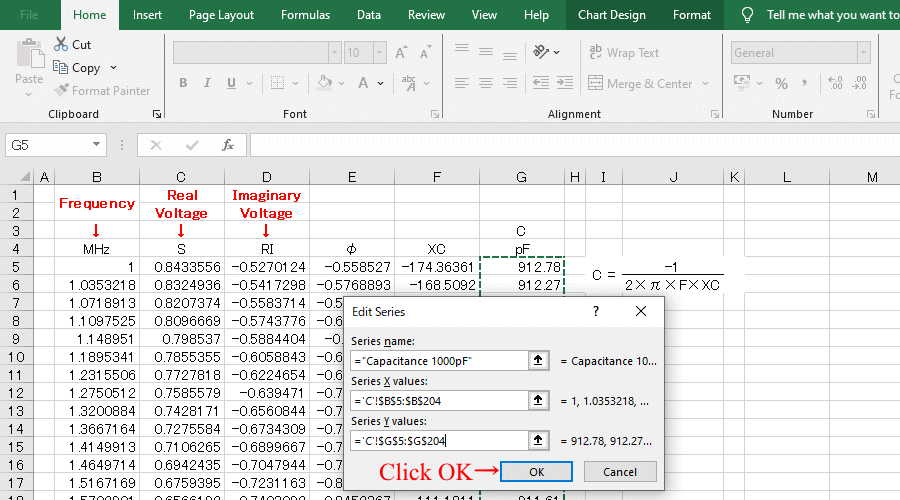
This image shows how to measure the S11 of a 1000pF capacitor using a Vector Network Analyzer (VNWA3E) DG8SAQ and create a capacitance vs. frequency graph from the data obtained. Currently, the range of the capacitance axis of the graph is being set.
This image shows how to measure the S11 of a 1000pF capacitor using a Vector Network Analyzer (VNWA3E) DG8SAQ and create a capacitance vs. frequency graph from the data obtained. The frequency and capacitance axes of the graph have been set up.
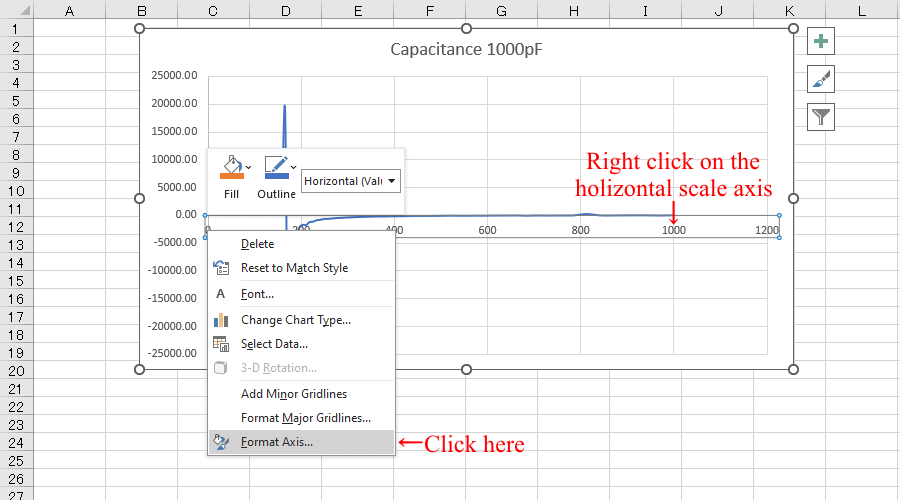
Make graphs bigger and easier to edit,
and edit by right-clicking the horizontal scale axis
This image shows how to measure the S11 of a 1000pF capacitor using a Vector Network Analyzer (VNWA3E) DG8SAQ and create a capacitance vs. frequency graph from the data obtained. It also shows the steps to set the frequency axis scale of the graph.
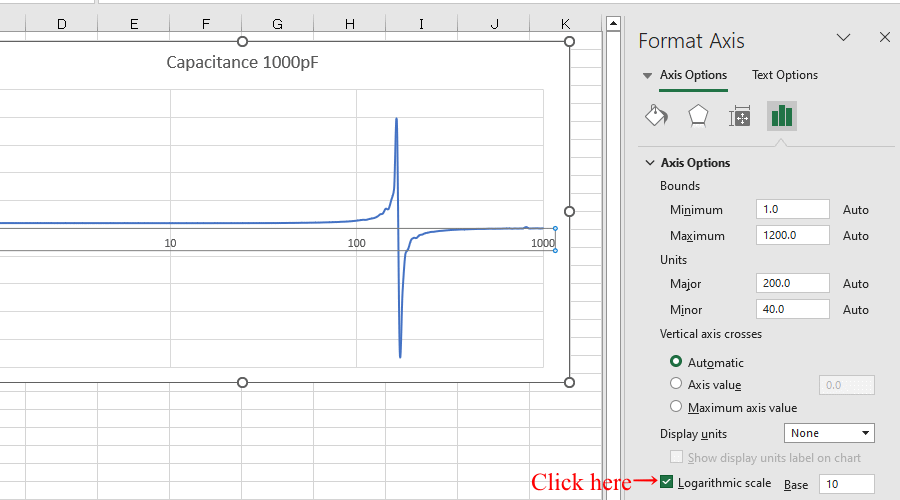
Convert to logarithmic scale
This image shows how to measure the S11 of a 1000pF capacitor using a Vector Network Analyzer (VNWA3E) DG8SAQ and create a capacitance vs. frequency graph from the data obtained. It also shows how to change the frequency scale of the graph to a logarithmic scale.
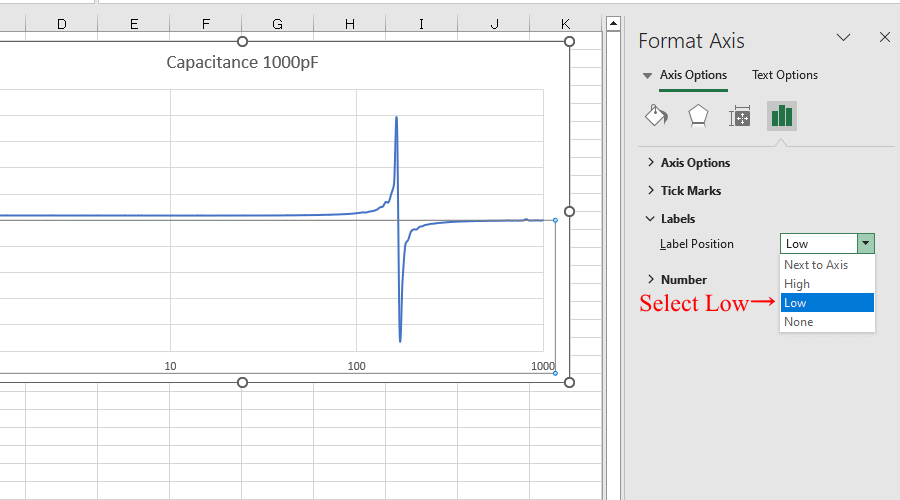
Move the holizontal scale position
This image shows how to measure the S11 of a 1000pF capacitor using a Vector Network Analyzer (VNWA3E) DG8SAQ and create a capacitance vs. frequency graph from the data obtained. It also shows how to set the frequency axis scale to the bottom.
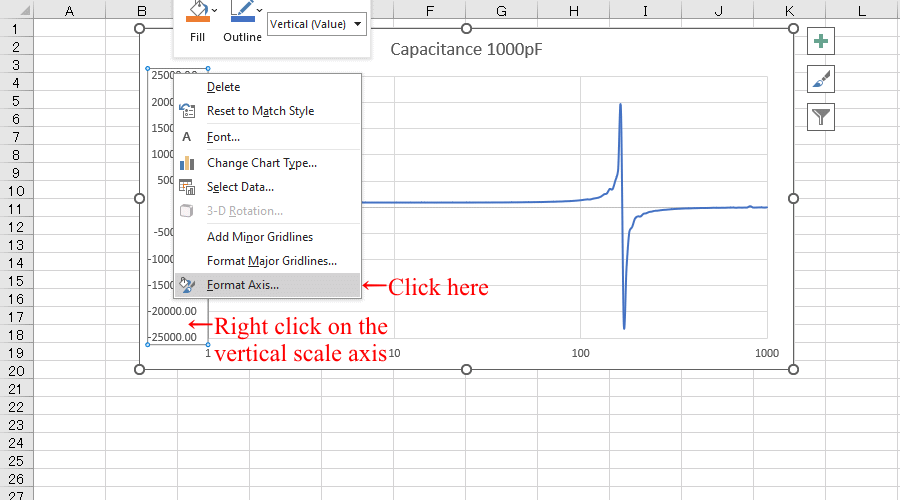
Edit by right-clicking the vertical scale axis
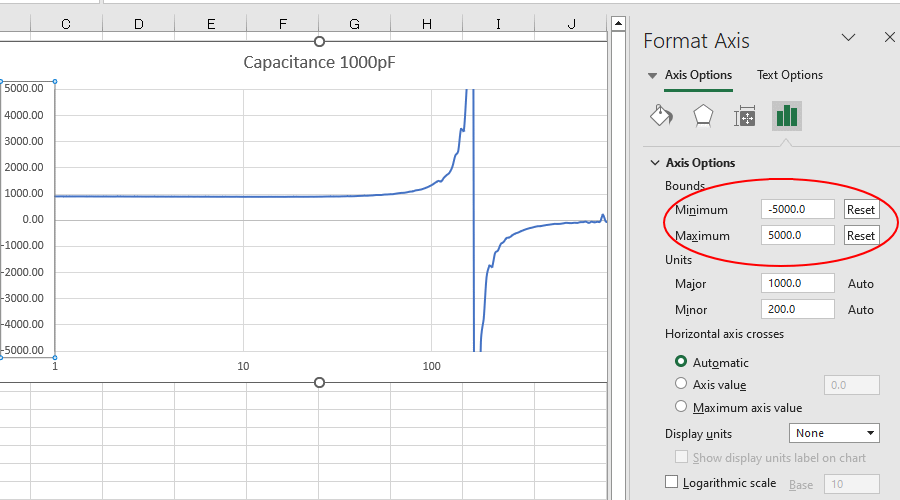
Change the maximum and minimum values ​​of the scale.
This image shows how to measure the S11 of a 1000pF capacitor using a Vector Network Analyzer (VNWA3E) DG8SAQ and create a capacitance vs. frequency graph from the data obtained. It also explains how to set the capacitance axis on the graph.
This image shows how to measure the S11 of a 1000pF capacitor using a Vector Network Analyzer (VNWA3E) DG8SAQ and create a capacitance vs. frequency graph from the data obtained. Set the maximum and minimum values ​​for the capacitance axis of the graph.
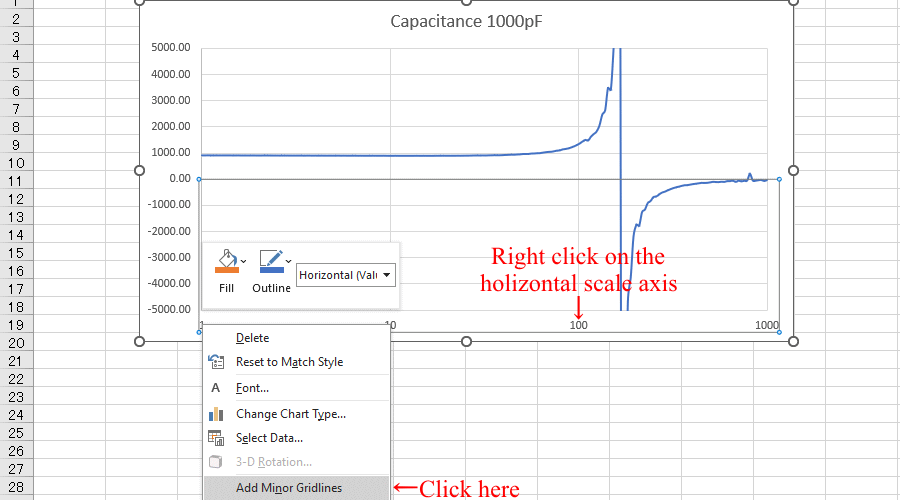
Adds minor tick marks to the horizontal axis.
This image shows how to measure the S11 of a 1000pF capacitor using a Vector Network Analyzer (VNWA3E) DG8SAQ and create a capacitance vs. frequency graph from the data obtained. A minor scale line has been added to the frequency axis of the graph.
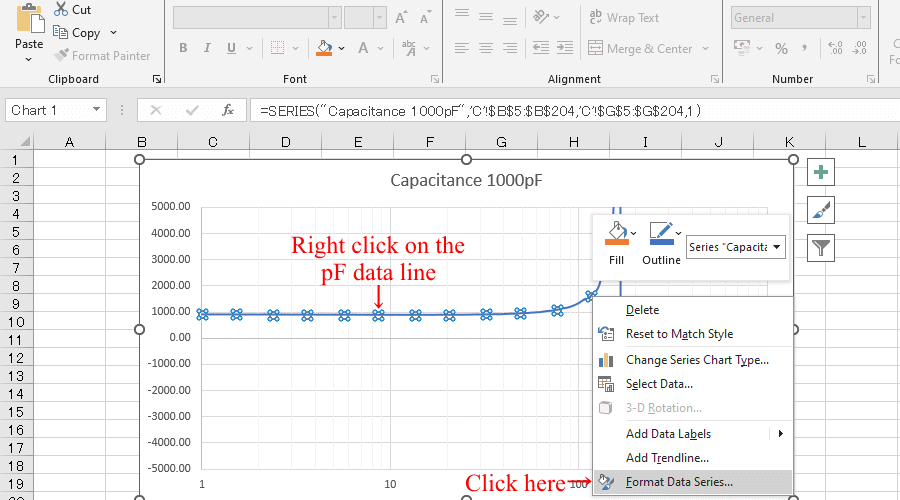
Right-click on pF data line to edit
This image shows how to measure the S11 of a 1000pF capacitor using a Vector Network Analyzer (VNWA3E) DG8SAQ and create a capacitance vs. frequency graph from the data obtained. Edit the data lines on the graph.
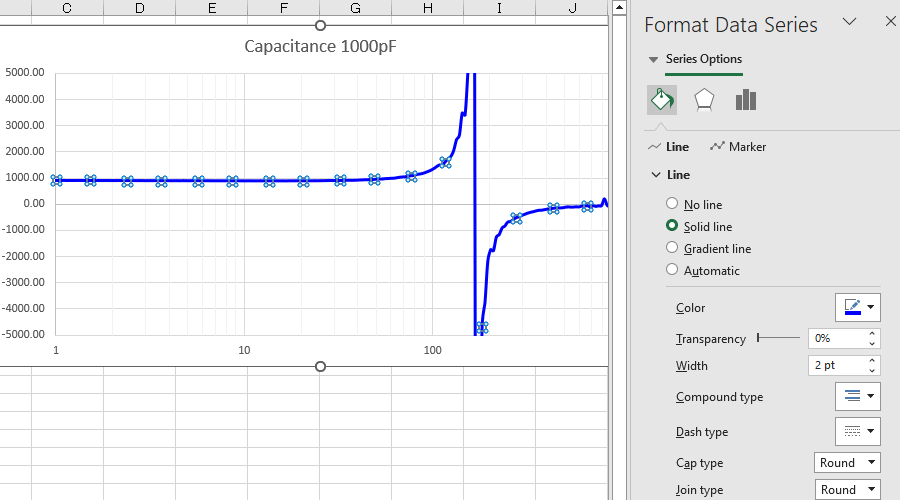
Edit the color and thickness of the graph
This image shows how to measure the S11 of a 1000pF capacitor using a Vector Network Analyzer (VNWA3E) DG8SAQ and create a capacitance vs. frequency graph from the data obtained. The color and thickness of the data lines on the graph have been changed.
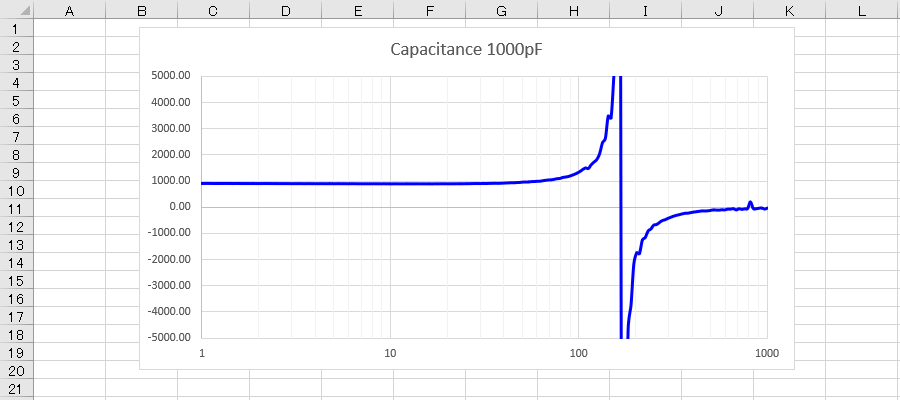
This image shows a graph of capacitance versus frequency created from data obtained by measuring the S11 of a 1000pF capacitor using a Vector Network Analyzer (VNWA3E) DG8SAQ.
Click here to download Create-S11CFgraph-VNWAs1p.xlsx

© SMPS Solution